Table of Contents
If you’re new to 3D printing, you’ve probably already hit the wall: FDM or resin? Both technologies can produce incredible results, but they’re built for different jobs, different budgets, and different workflows. This guide breaks down every major factor so you can make a confident, informed decision - or at least stop second-guessing yourself on Reddit at 2am.
How Each Technology Works
FDM (Fused Deposition Modeling) is the most common type of consumer 3D printer. A spool of plastic filament feeds into a heated nozzle, which melts the material and deposits it layer by layer onto a build plate. Think of a very precise hot glue gun tracing a pattern, building up your object one slice at a time. Printers like the Bambu Lab X1C, Prusa MK4, and Creality Ender series all use FDM.
Resin printing - which includes SLA (Stereolithography) and MSLA (Masked Stereolithography) - works differently. Instead of melting plastic, a UV light source cures liquid photopolymer resin. MSLA printers (the most common consumer resin type) use an LCD screen masked by a UV array to cure an entire layer of resin at once. The build plate lifts upward, peeling each cured layer away from an FEP film at the bottom of the resin vat. Printers like the Elegoo Saturn and Anycubic Photon Mono series are popular examples.
Print Quality and Detail
This is where resin has a decisive edge. Because resin is cured at the microscopic level using UV light, it can produce layer heights of 0.01–0.05mm with smooth surfaces and incredibly sharp detail. If you’re printing miniatures for tabletop games, jewelry, dental models, or anything with fine engraving or facial features, resin is almost always the better choice. The difference is immediately visible to the naked eye.
FDM printers, even dialed-in high-end machines, produce visible layer lines. Typical FDM layer heights are 0.1–0.3mm. That’s not a deal-breaker - sanding, priming, and post-processing can smooth out FDM prints - but for small, intricate objects, you’re working uphill. Where FDM shines is functional parts: brackets, enclosures, mechanical components, tooling jigs. These don’t need smooth surfaces, they need strength and durability.
Winner by category:
- Detail and surface finish: Resin
- Functional, structural parts: FDM
Material Options
FDM’s material library is massive and growing:
- PLA - easy to print, biodegradable, ideal for beginners
- PETG - tougher than PLA, food-safe options available, good chemical resistance
- ABS - heat resistant, impact resistant, but tricky to print (warping, fumes)
- TPU - flexible and rubber-like, great for phone cases, gaskets, wearables
- ASA - UV resistant, great for outdoor use
- Nylon - strong and wear resistant, used in mechanical parts
- Carbon fiber composites - lightweight and rigid, requires hardened nozzles
Resin materials are more specialized:
- Standard resin - good detail, somewhat brittle
- Tough/ABS-like resin - improved impact resistance
- Flexible resin - rubber-like, used for soft-touch parts
- Castable resin - burns cleanly for lost-wax casting in jewelry
- Dental and engineering resins - biocompatible, high precision
- Water-washable resin - reduces IPA usage, easier cleanup
FDM wins on breadth of materials and material cost. Resin wins on specialization for specific niches like dental, jewelry, and casting.
Cost Comparison
Entry-level printer cost:
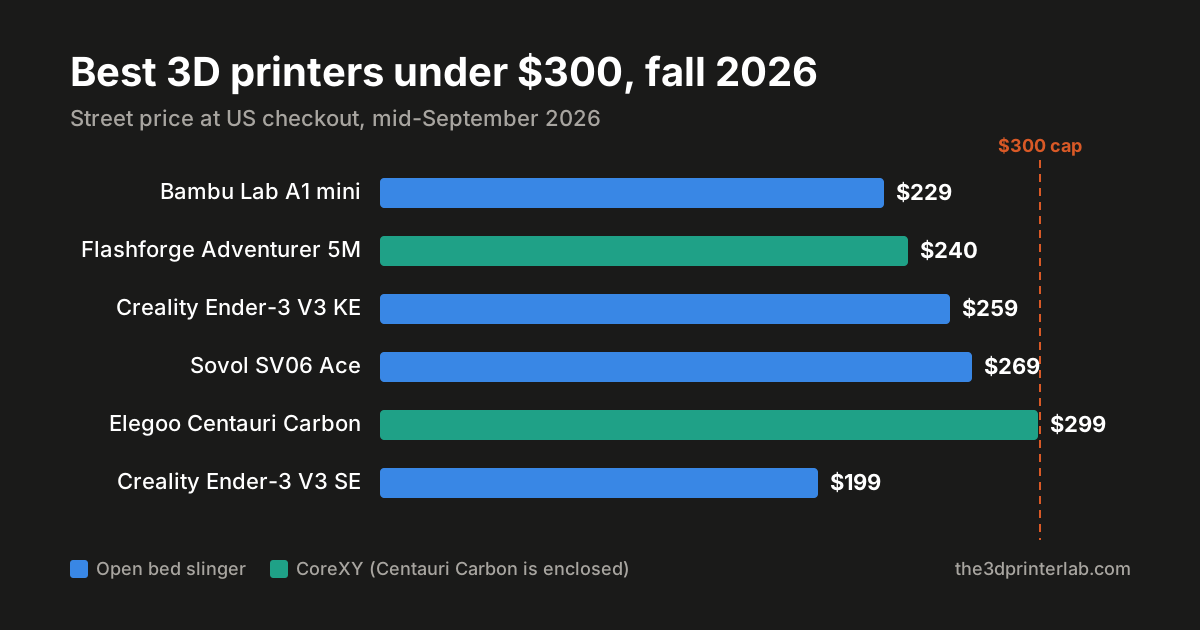
- FDM: $200–$400 for a solid beginner printer (Bambu A1 Mini, Prusa Mini, Ender 3 V3)
- Resin: $150–$350 for a capable MSLA printer (Elegoo Mars, Anycubic Photon Mono M5s)
On upfront cost, both are accessible. The real cost difference shows up over time.
Material cost:
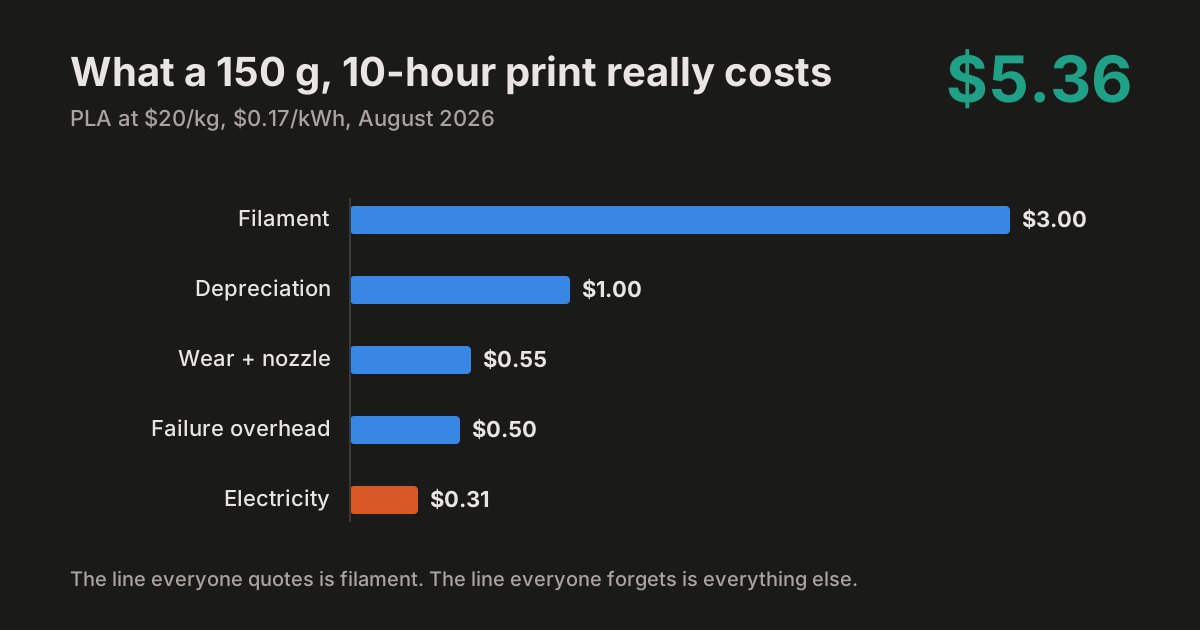
- FDM filament runs $15–$30 per kg for PLA/PETG, more for specialty materials
- Resin runs $20–$50 per liter, and you can go through it faster than you’d expect
Consumables - the hidden cost of resin:
- FEP/nFEP film (needs replacing every few hundred prints): $5–$15 per sheet
- Isopropyl alcohol (IPA) for washing prints: ongoing cost
- Nitrile gloves (mandatory - you should never touch uncured resin)
- UV curing station if not using sunlight
- Dedicated washing station
FDM consumables are mostly just filament and the occasional nozzle swap. Resin printing has a longer tail of recurring costs.
Long-term verdict: FDM is cheaper to operate for most users. Resin is worth the extra cost when you need the print quality it delivers.
Print Speed
Resin has a counterintuitive speed advantage for certain jobs. Because MSLA printers cure an entire layer at once - regardless of how many objects are on the plate - adding more models to the build plate doesn’t dramatically increase print time. A full plate of 20 miniatures takes roughly the same time as printing one.
FDM prints every single layer line by line, so more objects = more time, always.
That said, modern FDM printers like the Bambu Lab X1C have become extremely fast. For large single objects or long functional prints, fast FDM can outpace resin once you factor in post-processing time.
Post-Processing
FDM post-processing is minimal. Remove supports, maybe sand a few spots, done. Some prints require no post-processing at all.
Resin post-processing is a full additional step:
- Remove the print from the build plate
- Wash in IPA (or water-washable solution) to remove uncured resin
- Post-cure under UV light to fully harden the part
- Remove supports carefully (resin supports can be brittle and leave marks)
- Dispose of waste resin and IPA properly - it cannot go down the drain
This adds 30–60 minutes to every print session. It also means resin printing is inherently messier and requires a dedicated workspace.
Safety Concerns
This is an area where resin printing demands respect. Uncured liquid resin is a skin and eye irritant, and some resins can cause sensitization reactions with repeated exposure. Resin fumes can be harmful in poorly ventilated spaces. Best practices:
- Always wear nitrile gloves when handling resin or wet prints
- Print in a well-ventilated area or use an enclosure with activated carbon filtration
- Never pour uncured resin down the drain - cure it in sunlight first, then dispose of as solid waste
- Wear eye protection if you’re prone to splashing
FDM is not without hazards either. Printing ABS and some other filaments releases ultrafine particles (UFPs) and VOCs. PLA is much safer, but printing in enclosed spaces still warrants ventilation. An enclosure with a HEPA/carbon filter is good practice for any material.
Bottom line: FDM with PLA is the more beginner-friendly, low-risk option. Resin requires more safety discipline, but with proper habits it’s manageable.
Build Volume (Print Size)
FDM wins here, and it’s not close. Most FDM printers offer build volumes starting around 220x220x250mm and scaling up significantly from there. Large-format FDM machines can print objects the size of a small suitcase.
Resin printers are limited by the LCD screen size. Most consumer MSLA printers max out around 200x125mm on the XY plane. Larger mono 8K and 12K printers are pushing this further, but resin isn’t where you go for big prints.
If you need to print large props, cosplay armor, furniture components, or full-size replacement parts, FDM is your technology.
Maintenance and Reliability
Modern FDM printers are remarkably reliable. Bed leveling - once the biggest headache - is now automatic on most machines. Nozzle clogs happen, but they’re easy to clear. A well-maintained FDM printer can run for years with basic upkeep.
Resin printers require more careful maintenance. The FEP film at the bottom of the vat wears out and must be replaced. Failed prints can leave cured resin stuck to the FEP, which can crack it. Vat leaks are a messy possibility. Keeping the build plate properly leveled and the vat clean is an ongoing task.
Neither technology is maintenance-free, but FDM is generally more forgiving for beginners and casual users.
Best Use Cases
Choose FDM if you want to:
- Print functional parts, brackets, enclosures, or tools
- Work with a wide variety of materials (flexible, heat-resistant, food-safe)
- Print large objects
- Keep post-processing simple
- Work in a smaller space or without dedicated ventilation
- Minimize consumable costs over time
Choose resin if you want to:
- Print miniatures, figurines, or tabletop gaming models
- Create jewelry, dental models, or castable masters
- Achieve smooth, museum-quality surface finish
- Print highly detailed small objects with fine features
Can You Own Both?
Absolutely - and many serious makers do. FDM and resin are genuinely complementary. A common setup is using FDM for structural prints, large objects, and functional prototyping, while keeping a resin printer for high-detail work. The two technologies cover each other’s weaknesses almost perfectly.
If budget is a concern, start with FDM. It’s more versatile, cheaper to run, and easier to learn. Once you’ve got your workflow dialed in and you find yourself wishing for finer detail, adding a resin printer to your bench is a natural next step.
The Bottom Line
Neither FDM nor resin is the objectively better technology - they’re tools built for different jobs. FDM is the practical workhorse: versatile, affordable, low-maintenance, and capable of printing nearly anything at scale. Resin is the detail specialist: unmatched surface quality for small, intricate prints, with a steeper learning curve and more demanding workflow.
Figure out what you want to make first, then let that decision drive the technology choice. Nine times out of ten, that clarity makes the decision obvious.
Sponsored
Ready to Print?
Browse our guides for more tips on getting the best results from your printer.
Browse All GuidesReady to Print?
Browse our guides for more tips, reviews, and step-by-step tutorials to get the most out of your 3D printer.
Browse All Guides