 Getting Started
Table of Contents
FDM vs Resin Printing: Which Is Right for Your Project
If you’re getting into 3D printing, or you already own one type of printer and you’re thinking about adding another, the FDM vs resin question comes up fast. Both technologies can produce incredible results, but they work in fundamentally different ways and excel at very different things.
This guide will walk you through the real differences between FDM and resin 3D printing so you can pick the right tool for your project without wasting money or time.
How Each Technology Works
Let’s start with the basics.
FDM (Fused Deposition Modeling) works by melting a plastic filament and extruding it through a hot nozzle, layer by layer, to build up a 3D object. Think of it like a very precise hot glue gun controlled by a computer. The most common materials are PLA, PETG, ABS, and TPU.
Resin printing (MSLA/SLA) uses a vat of liquid photopolymer resin that gets cured by UV light, one layer at a time. A screen or laser exposes each layer, hardening the resin in the exact shape needed. The build plate lifts up between each layer, and the object forms upside down.
The core difference: FDM builds with melted plastic strands, resin cures liquid into solid with light. This fundamental difference drives everything else.
Print Quality Comparison
This is where resin pulls ahead, and it’s not even close for certain applications.
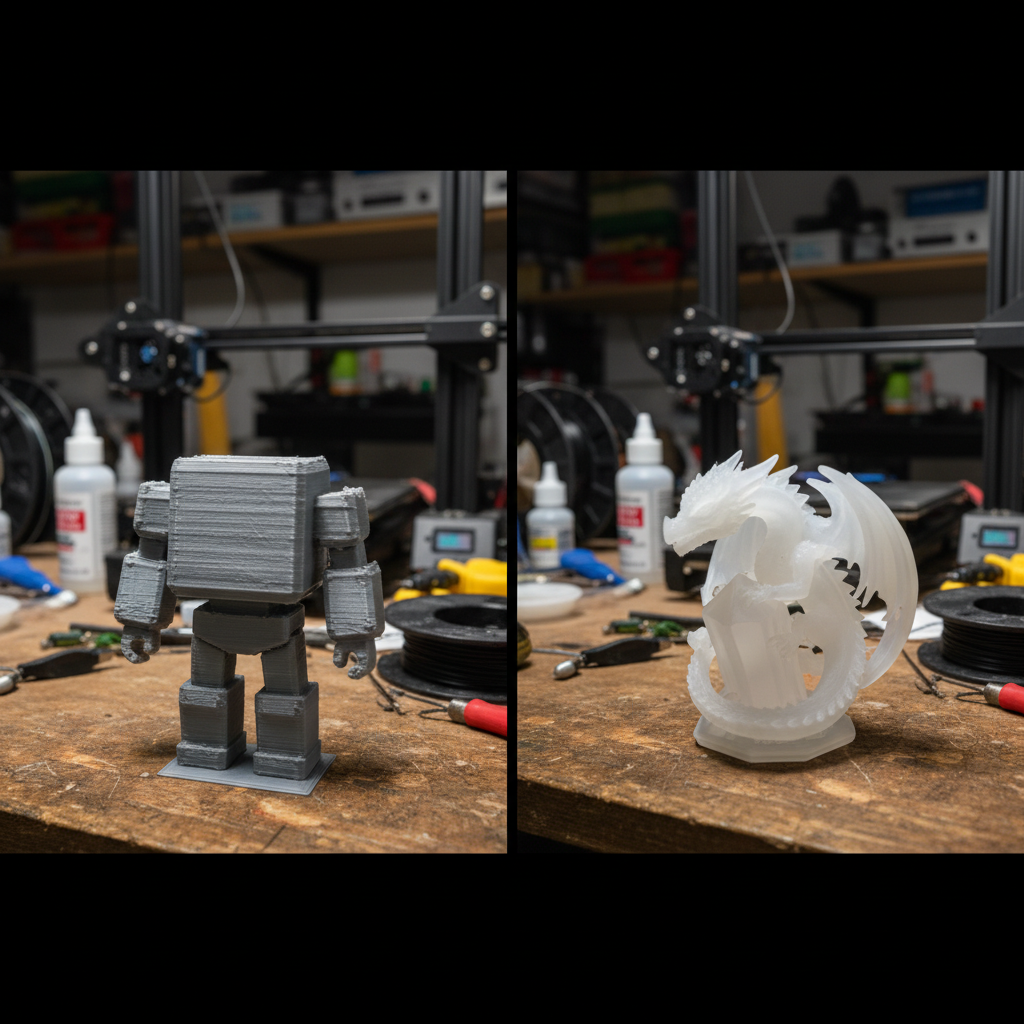
Resin printers can achieve layer heights as fine as 0.01mm (10 microns). At that resolution, layer lines are essentially invisible to the naked eye. Surface finish is smooth, details are crisp, and small features come out clean.
FDM printers typically print at 0.1mm to 0.3mm layer heights. Even at 0.1mm, layer lines are visible on curved surfaces. You can reduce their appearance with sanding, priming, and post-processing, but you’ll never match resin’s out-of-the-box smoothness.
Winner for detail work: Resin, by a mile. Miniatures, jewelry, dental models, and anything with fine surface detail should go resin.
Winner for functional parts: FDM. The layer adhesion and material strength of FDM prints makes them better suited for parts that need to handle stress, heat, or mechanical loads.
Cost Breakdown
Here’s where things get interesting, because the answer depends on what you’re measuring.
Upfront Printer Cost
- Entry-level FDM printer (Ender 3 series, Bambu A1 Mini): $150-300
- Entry-level resin printer (Elegoo Mars/Saturn series): $150-350
- Mid-range FDM (Bambu P1S, Prusa MK4): $500-800
- Mid-range resin (Elegoo Saturn 4, Phrozen Sonic): $300-600
The entry prices are surprisingly similar these days. Resin printers have dropped dramatically in price over the past couple of years.
Material Cost
- PLA filament: roughly $15-25 per kg
- PETG filament: roughly $18-28 per kg
- Standard resin: roughly $25-40 per liter
- Engineering/specialty resin: $50-80+ per liter
A kilogram of filament goes a long way. A liter of resin can too, but resin parts also require isopropyl alcohol for washing and UV light for curing, which adds ongoing cost.
Hidden Costs
Resin printing comes with extras that FDM doesn’t:
- Isopropyl alcohol (IPA) for washing prints
- A wash and cure station ($80-150, or DIY)
- Nitrile gloves (resin is toxic to skin)
- Proper ventilation or an enclosure with a filter
- FEP film replacements for the resin vat
FDM’s hidden costs are lower, mostly limited to replacement nozzles, build plate adhesive, and the occasional new Bowden tube or hotend.
Winner for budget-friendly printing: FDM, especially for larger prints and ongoing material costs.
Speed
FDM print speed has improved dramatically. Modern printers like the Bambu Lab X1 and P1 series can print at 200-500mm/s, making quick work of many projects. A typical medium-sized FDM print might take 2-6 hours.
Resin printers cure an entire layer at once, regardless of how many objects are on the build plate. That means printing one miniature takes the same time as printing a full plate of 20 miniatures. A single mini might take 2-3 hours, but a batch of 20 also takes 2-3 hours. For batch production of small parts, resin is incredibly efficient.
Winner for single large parts: FDM Winner for batches of small parts: Resin
Material Options and Strength
FDM has a massive advantage in material variety and mechanical properties:
- PLA - Easy to print, biodegradable, great for prototypes and display pieces
- PETG - Stronger than PLA, good chemical resistance, food-safe options available
- ABS/ASA - Heat resistant, durable, good for outdoor or automotive use
- TPU - Flexible, rubber-like material for gaskets, phone cases, and wearables
- Nylon - Extremely tough, good for functional mechanical parts
- Carbon fiber composites - Lightweight and rigid for structural applications
Resin materials have been catching up, but they still lean toward the brittle side:
- Standard resin - Good detail, moderate strength, can be brittle
- ABS-like resin - Better impact resistance than standard
- Flexible resin - Rubber-like properties, but limited durability
- Tough/engineering resin - Improved strength for functional parts
- Castable resin - Used for lost-wax casting in jewelry making
For anything that needs to withstand force, heat, or long-term mechanical stress, FDM materials are generally superior.
Winner for material versatility and strength: FDM
Post-Processing
Every 3D print needs some cleanup, but the process is very different for each technology.
FDM Post-Processing
- Remove support structures (snap off or cut)
- Sand layer lines if desired
- Prime and paint for a smooth finish
- Acetone smoothing for ABS parts
- Generally safe to handle immediately
Resin Post-Processing
- Drain excess resin from the print
- Wash in IPA or a water-washable solution
- Remove supports carefully (they can leave marks)
- UV cure the print for final hardening
- Sand and paint if desired
- Must wear gloves throughout, uncured resin is a skin irritant and sensitizer
Resin post-processing is more involved and requires more care. You’re working with chemicals, and uncured resin needs to be handled responsibly. Don’t pour it down the drain, and don’t expose it to your skin.
Winner for easy post-processing: FDM
Best Use Cases for Each
Choose FDM When You Need:
- Functional prototypes and mechanical parts
- Large prints (enclosures, brackets, organizers)
- Outdoor or heat-exposed parts
- Flexible or multi-material prints
- Quick, low-cost prototyping
- Prints for everyday household use
- A beginner-friendly experience
Choose Resin When You Need:
- Tabletop gaming miniatures and figurines
- Jewelry models and casting masters
- Dental or medical models
- Highly detailed display pieces
- Batch production of small, identical parts
- Smooth surface finish without heavy post-processing
- Precision parts with tight dimensional accuracy
The “Why Not Both?” Argument
Honestly, if you’re serious about 3D printing as a hobby or side business, owning one of each gives you the most flexibility. They complement each other perfectly. Use FDM for your functional prints, enclosures, and large projects. Use resin for your detail work, minis, and anything that needs a flawless surface.
Many makers start with an FDM printer because it’s more forgiving, safer to work with, and handles a wider range of projects. Then they add a resin printer once they have a specific need for high-detail work.
Our Recommendation for Beginners
If you can only buy one printer and you’re not sure what you’ll be printing, go FDM. It’s more versatile, easier to maintain, safer to operate, and the material costs are lower. A good entry-level FDM printer will handle 80% of what most people want to make.
If you already know you want to print miniatures, models with fine detail, or jewelry, go straight to resin. Don’t waste time trying to get FDM to do what resin does naturally.
The best 3D printer for beginners is the one that matches the projects you actually want to make. Don’t overthink it. Pick one, start printing, and learn as you go. You can always add the other type later.
Quick Comparison Table
- Detail quality: Resin wins
- Material strength: FDM wins
- Print size: FDM wins
- Batch efficiency: Resin wins
- Material variety: FDM wins
- Ease of use: FDM wins
- Post-processing: FDM wins (simpler)
- Surface finish: Resin wins
- Safety: FDM wins
- Cost per print: Depends on size and quantity
Both technologies have earned their place in the maker community. The right choice is the one that fits your projects, your workspace, and your comfort level. Happy printing.
Sponsored
Ready to Print?
Browse our guides for more tips on getting the best results from your printer.
Browse All GuidesReady to Print?
Browse our guides for more tips, reviews, and step-by-step tutorials to get the most out of your 3D printer.
Browse All Guides